I vibe coded an offline card scanner for the National
10,023 trading cards identified and priced entirely on-device. No server, no signal, no problem. Here's the classic computer-vision rabbit hole I fell down this weekend, and how a benchmark I shipped at NeurIPS 2023 came back to stress-test the scanner.
On this page · 12 sections
Why build a card scanner in 2026?
Two honest reasons.
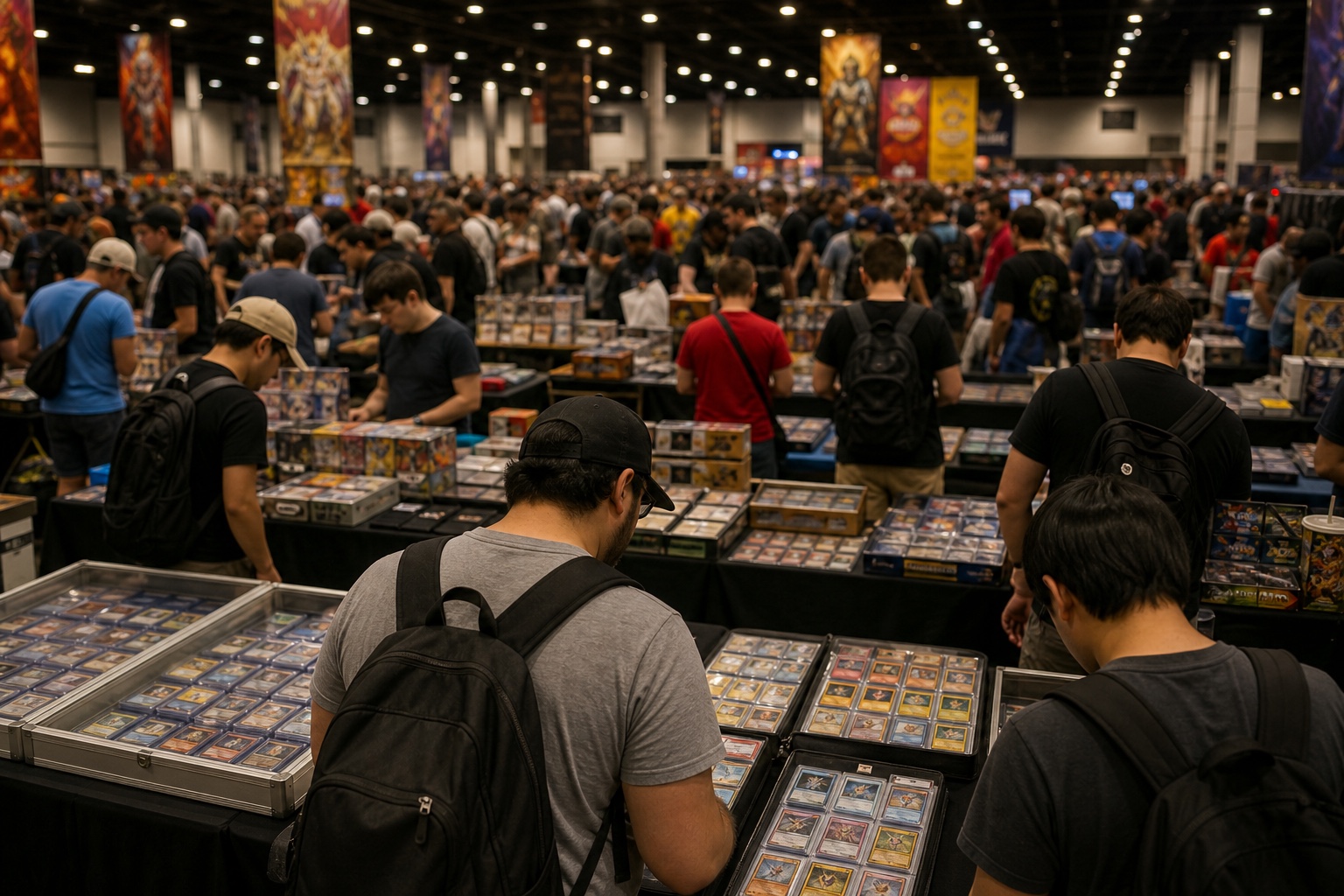
Show-floor wifi is where price checks go to die. Anyone who's been to a big card show knows the moment: you're holding the card, the seller is watching, and the price site won't load. The 2024 National drew a record crowd of more than 100,000; that's a lot of phones fighting over the same access points. I'm hunting a want-list at the National this year, and the fix isn't a better data plan. It's crawling cards from the players and sets I'm hunting before the show, and carrying the prices with me.
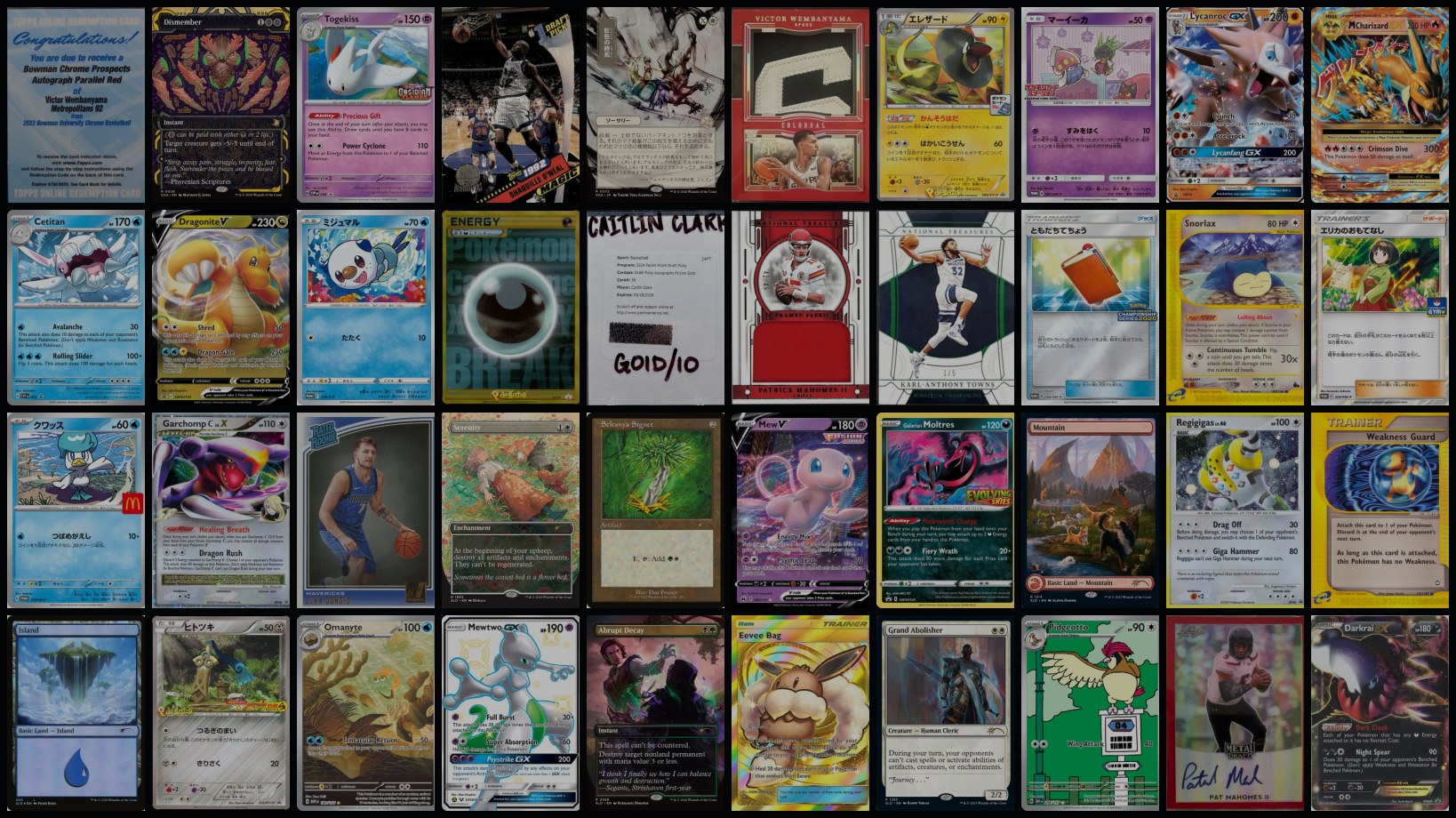
That's only realistic because the hunt is specific: my twenty-ish players, ten-ish Pokémon, the big chase inserts, and one particular run of Magic variants. Ten thousand cards, not the hundreds of millions in existence. A want-list crawl fits in an app. And since I work in computer vision and collect for fun, I got to vibe some gray-haired CV algorithms (ORB, k-means, RANSAC) into a SwiftUI Pokédex.
My NeurIPS 2023 benchmark deserved a rematch. I co-authored FORB, a benchmark for object retrieval on flat images: book covers, paintings, movie posters... and Pokémon cards. The original leaderboard assumed heavy hardware. Three years later, the fun question was: what if we measured mobile-deployable pipelines instead? Who wins the benchmark then?
Build the index once. Carry the whole search engine.
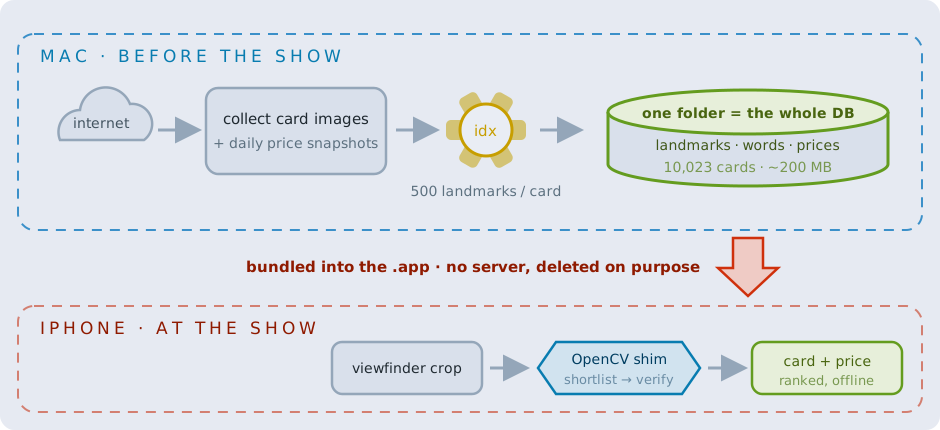
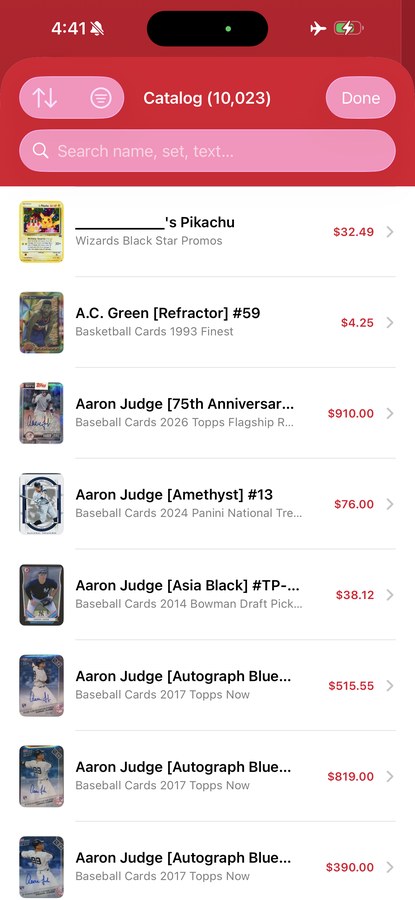
The crawl is hunt-driven. A set of polite Python scrapers collects card images and daily price snapshots from public card databases and price-tracking sites. Every card gets a full grade ladder (raw through PSA 10), refreshed by a daily cron; the offline app carries the latest snapshot bundled with that build. Deduped, it's one cross-category database: 10,023 cards. Pokémon 4,774 · Magic 2,955 · Sports 2,294.
The "database" is four small files. No SQL, no embedding service:
descriptors.bin: up to 500 keypoints per card plus their 32-byte ORB descriptors. ~20 KB per card.vocab.bin/bow.bin: the bag-of-visual-words index (more below).items.json: titles, sets, markdown details, prices.
The enemy: cards you can't tell apart by name
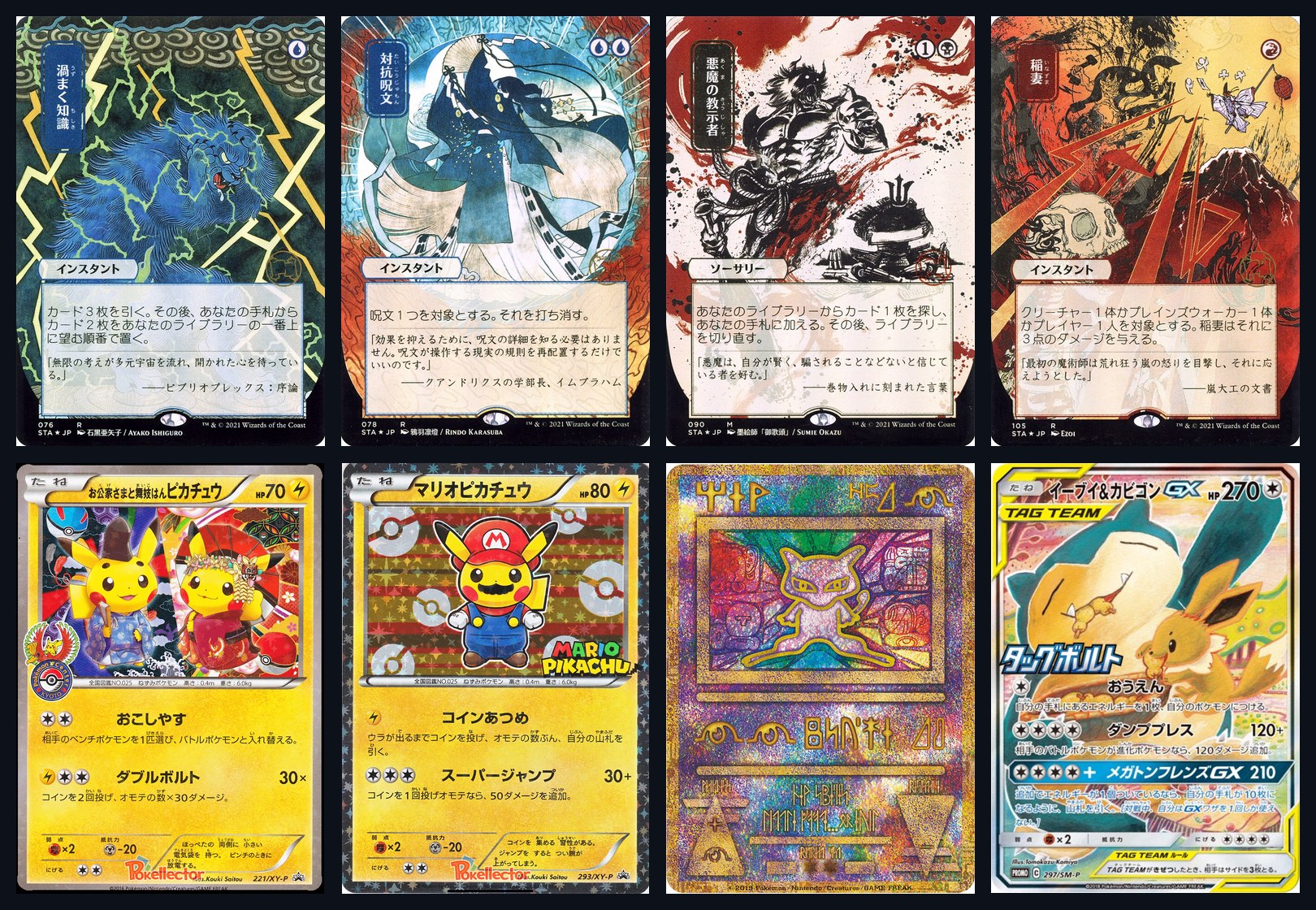
Before discussing the algorithms, meet the adversary, and the reason "just use a semantic embedding" doesn't work here. My database contains 17 Lightning Bolts: different sets, different frames, some sharing the exact same art.
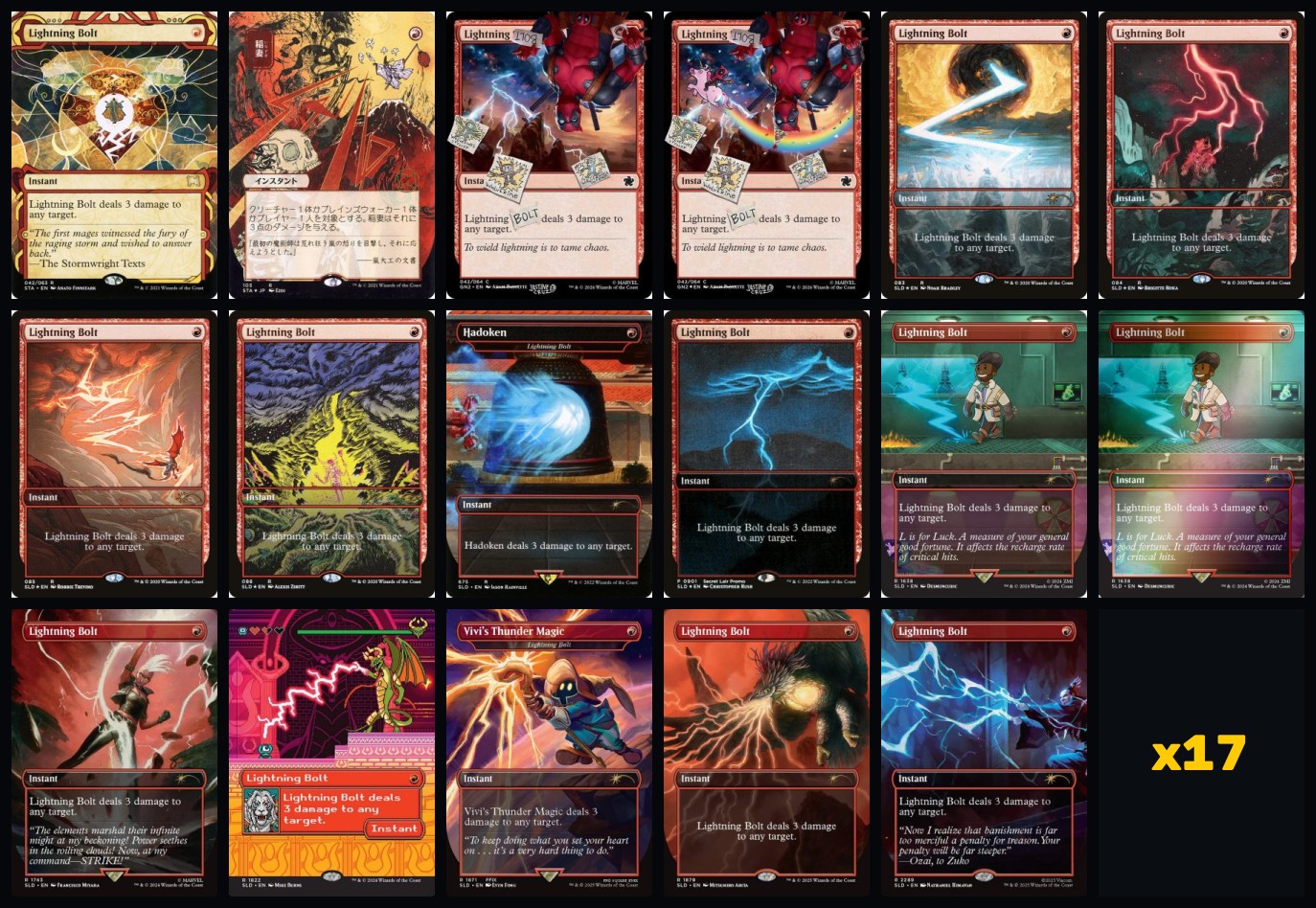
Text can't distinguish these prints; the names are identical. And an embedding shouldn't be trusted to make the final call, because several versions share a name, a subject, even the artwork. Embeddings were trained to pool them. But an embedding can still retrieve the right neighborhood. What decides which printing is actually in the camera is keypoint geometry: borders, frames, and set stamps land in physically different places. That's the thesis of the whole pipeline: embeddings find the neighborhood; geometry finds the printing. Collectors don't want "a Lightning Bolt". They want to know which one, because they're priced differently.
And it gets worse: part of my want-list is printed in Japanese. The hunt includes the Mystical Archive's Japanese-exclusive alternate arts (one of the seventeen bolts above is printed as 稲妻) and a shelf of Japanese Pokémon promos. On the show floor, "just type the name into a search box" assumes you can type the name. The camera doesn't care what script a card is printed in: keypoints don't read, they just look.
Matching: landmarks, then a lie detector
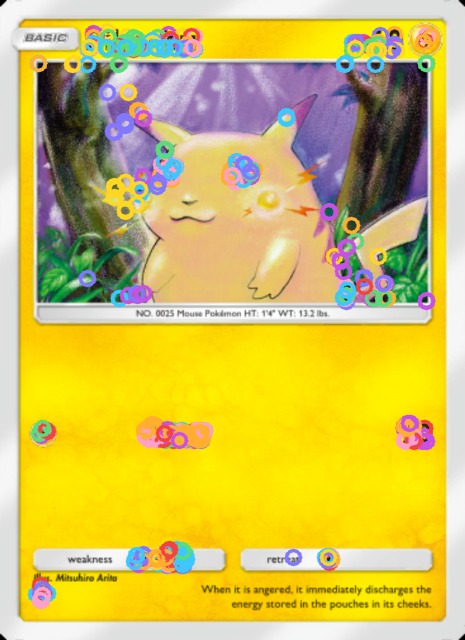
Step 1: find 500 tiny landmarks per card. ORB (2011, patent-free) picks distinctive corners at multiple scales (art edges, text, set symbols), keypoints in CV terms, and turns each into 256 bits of "is this pixel brighter than that one". Those bits are the whole trick, twice over. Compact: a landmark is 32 bytes; a card is ~16 KB of descriptors, ~20 KB on disk with keypoint positions; and the entire 10,023-card index is ~200 MB. Small enough to ship inside an app. Fast to compare: similarity is just Hamming distance, how many of the 256 bits disagree, which the CPU computes in a handful of XOR + popcount instructions.
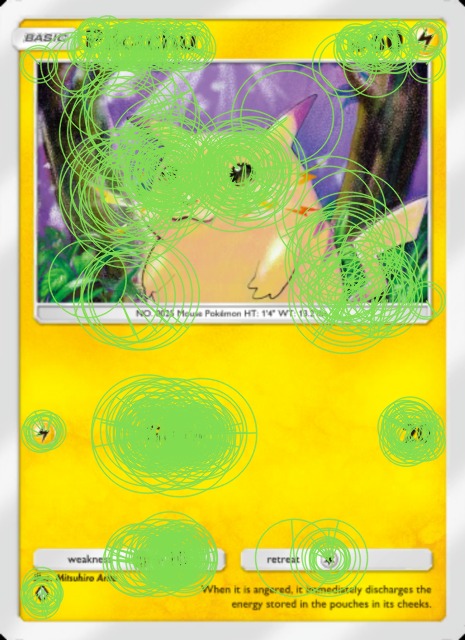
Each comparison is cheap. Running the full verifier against ten thousand cards is not, and that tension drives everything that follows.
// similarity between two ORB descriptors: word-level XOR + popcount
int hamming256(const uint64_t a[4], const uint64_t b[4]) {
    return popcount(a[0] ^ b[0]) + popcount(a[1] ^ b[1])
         + popcount(a[2] ^ b[2]) + popcount(a[3] ^ b[3]);
}
Step 2: geometry is the lie detector. Descriptor matches alone lie constantly (yellow borders match yellow borders). Three checks separate real matches from coincidence.
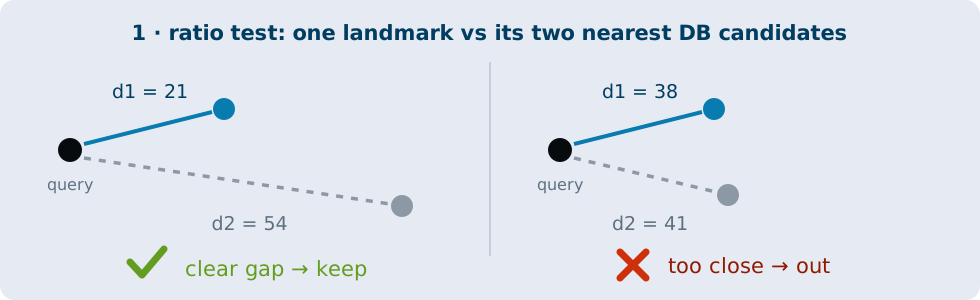
1. The Lowe ratio test. For each keypoint, find its two nearest neighbors by Hamming distance; if the best match isn't clearly better than the runner-up, throw it out.
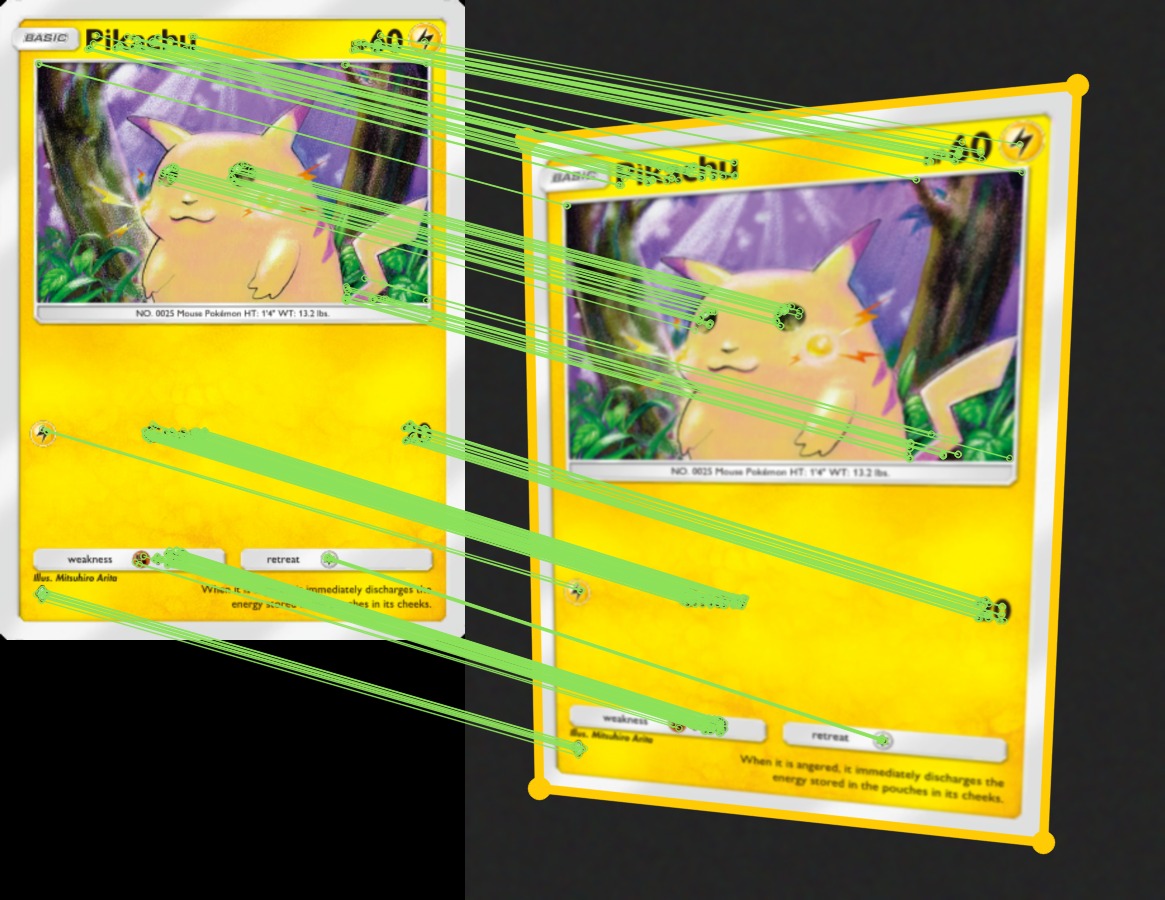
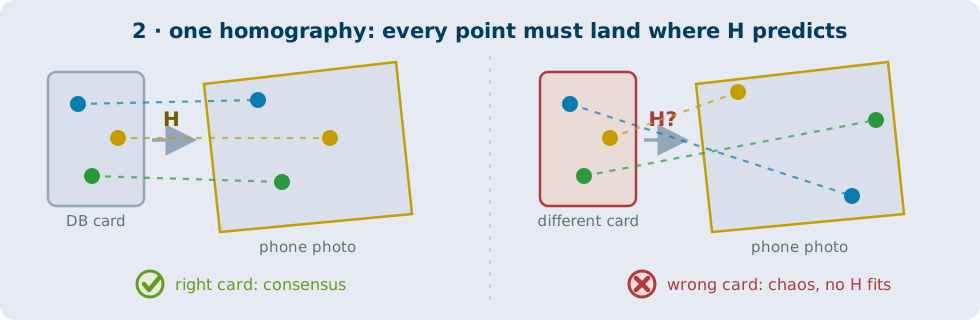
2. One homography must explain everything. A homography is the perspective transform that maps one view of a flat surface onto another, which is exactly what holding a card at an angle does to it. To find one homography that explains all the surviving matches, MAGSAC++ plays the classic RANSAC game (1981): propose a transform from a few random matches, count how many of the rest agree, repeat, keep the winner. Right card: consensus. Wrong card: chaos.
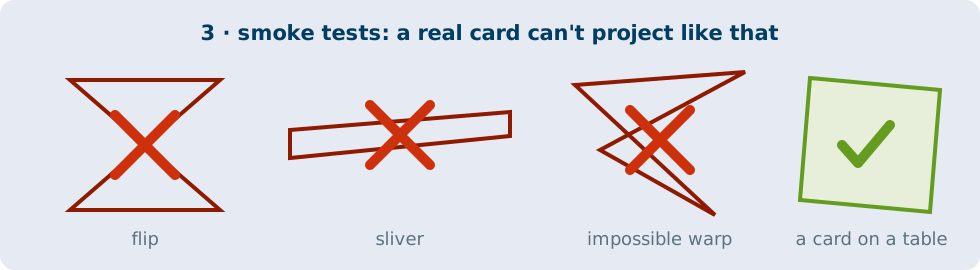
3. Geometry smoke tests. Reject flips, slivers, and impossible warps. A real card can't project like that. (These are the same sanity checks FORB's baseline pipeline uses: arXiv:2309.16249.)
The whole verifier fits in a screenful. Here it is in Python; the app runs the same logic in its Obj-C++ shim:
for card in candidates:                       # the shortlist, not all 10k
    knn  = matcher.knnMatch(card.desc, query.desc, k=2)
    good = [m for m, n in knn
            if m.distance < 0.8 * n.distance]           # 1 · ratio test
    if len(good) < 10:
        continue
    H, mask = cv2.findHomography(pts(card, good), pts(query, good),
                                 cv2.USAC_MAGSAC, 5.0)  # 2 · one transform?
    if H is None or mask.sum() < 8:
        continue
    if not sane_homography(H) or not sane_quad(H, card, query):
        continue                                        # 3 · smoke tests
    results.append((card.id, int(mask.sum())))          # score = inliers

ranked = sorted(results, key=lambda r: r[1], reverse=True)
The score is just the inlier count: whichever card explains the most matches with one homography wins.
Brute force holds ~90%, and takes 4.6 seconds
Run that verification against every card in the DB and you hold roughly 90% top-1 on the hardest queries at every database size I tested, 500 through 10,000. The catch is that it's linear. On my iPhone, a query grows from 195 ms at 500 cards to 4.57 s at 10,000.
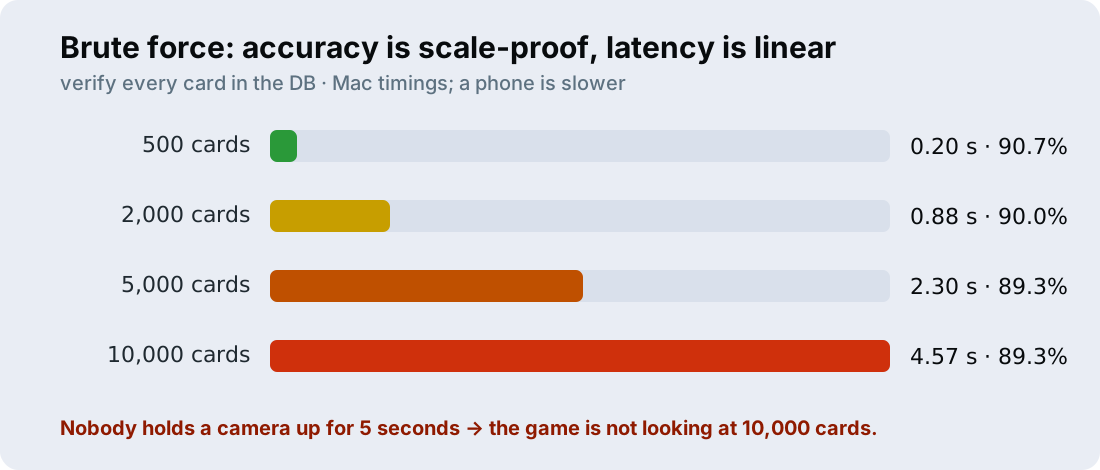
Nobody points a camera at a card and waits five seconds. Let's be a little smarter than exhaustively looking at all 10,000 cards.
The classic baseline: shortlist with bag of visual words
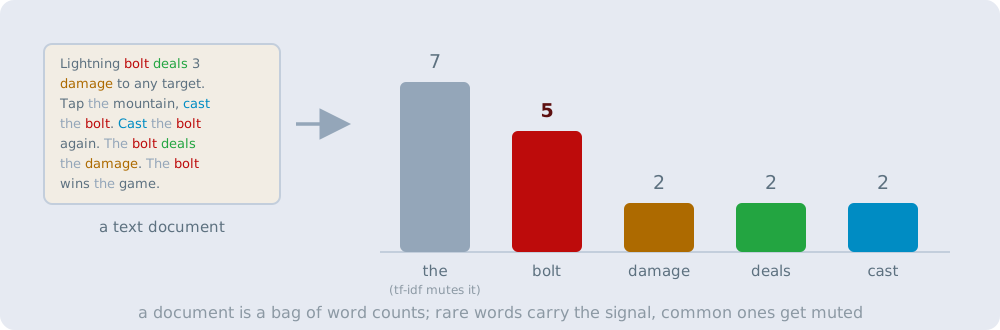
Text search solved this problem decades ago. A search engine doesn't read documents, it counts words: every document becomes a histogram of its word counts, tf-idf weighting mutes common words and amplifies rare ones, and "similar documents" just means "similar histograms". Comparing histograms is one cheap vector operation, which is exactly the kind of shortlist we're after. Video Google (2003) imported that machinery into computer vision wholesale, with one puzzle to solve first: images don't come with words. Where does a vocabulary for pixels come from?
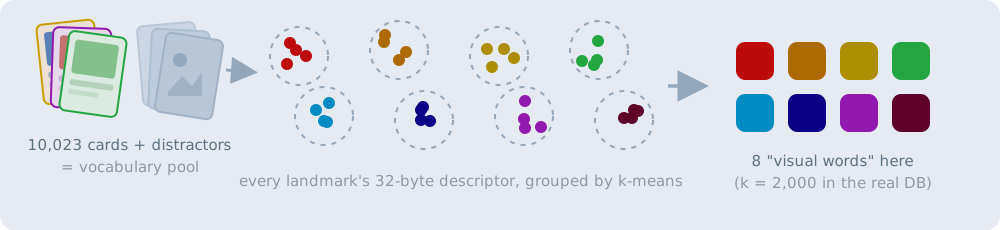
Build a vocabulary (offline). Pool every ORB descriptor in the database, plus a pile of unrelated distractor images so the words generalize instead of overfitting the corpus, and run k-means. Each cluster center becomes a "visual word":
Turn each card into a histogram. Every landmark snaps to its nearest word, and the card becomes a tf-idf-weighted word histogram. A card is a text document now, and rare words count more:
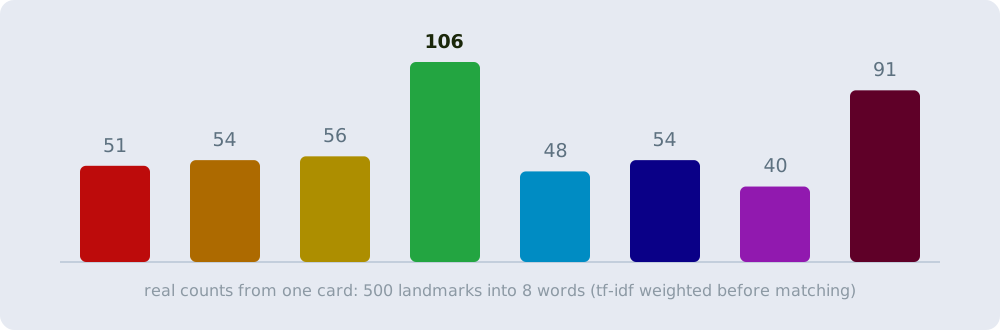
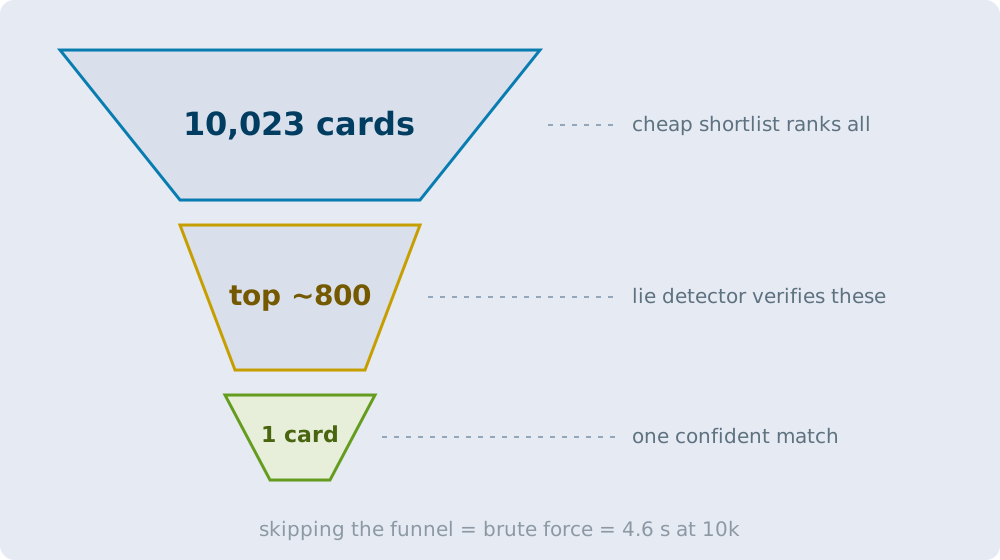
Shortlist, then verify. At query time the scan becomes the same kind of vector, one matrix multiply gets cosine similarity to every card at once, and only the top candidates go down the funnel to the expensive geometric verification:
# offline: a vocabulary, then one vector per card
vocab     = kmeans(all_orb_descriptors, k=2000)          # "visual words"
card_vecs = [l2norm(tfidf(histogram(card, vocab))) for card in db]

# per scan: one matrix multiply ranks the whole database
q         = l2norm(tfidf(histogram(query, vocab)))
shortlist = argsort(card_vecs @ q)[-N:]                  # cosine top-N
Roughly 30× faster than brute force at 10k, and at small scale it gives up almost nothing.
The plot twist: classic BoW collapses at scale
Here's what the benchmark showed. Same 150 real-photo queries, growing database:
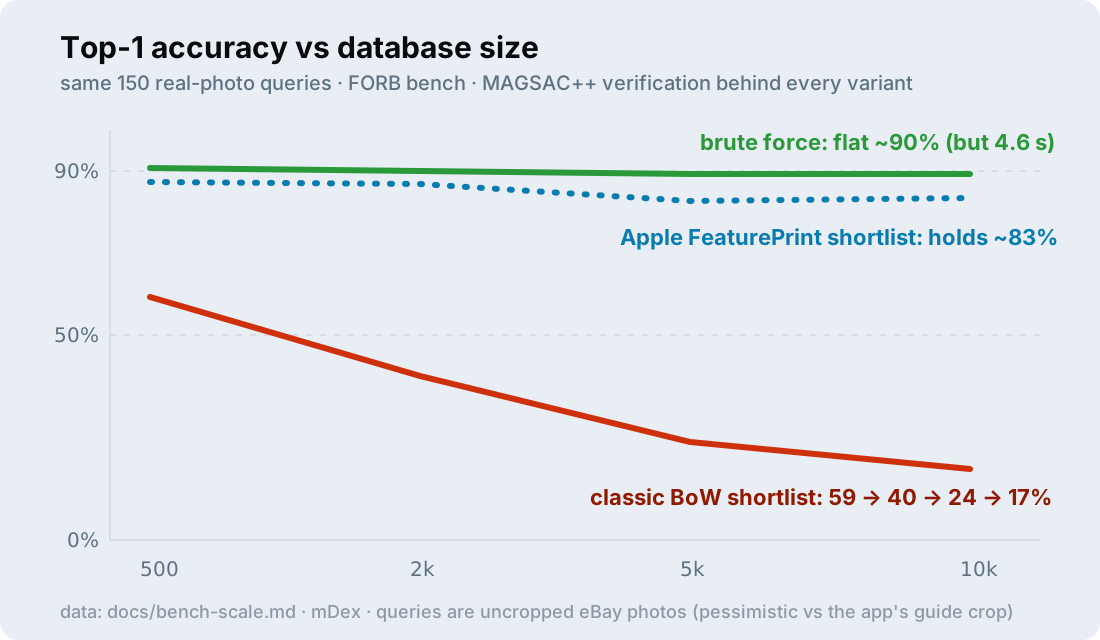
Brute force: near-flat at roughly 90%. Classic BoW: 59 → 40 → 24 → 17%. And the diagnosis that took a benchmark to see: shortlist recall dominates the failures. Once the correct card survives retrieval, geometry almost always ranks it first. Which is great news, because it means one component, the shortlist, is where the improvement budget should go.
The fix: swap the shortlist, keep the verifier
Text search made this exact move years ago. The sparse tf-idf histogram gave way to embeddings: a neural network reads the whole document and produces a compact dense vector, so "similar" stops meaning "shares rare words" and starts meaning "lands nearby in vector space". The same swap works for images. Instead of counting hand-built visual words, let a network digest the whole card into a few hundred floats. The shortlist machinery doesn't change at all, ranking is still one matrix multiply; only the vectors get smarter.
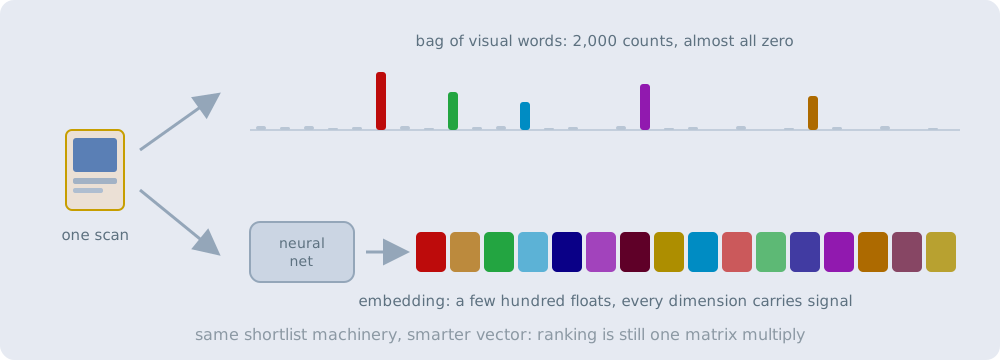
I benchmarked embedding shortlists: DINOv2, MobileCLIP, and Apple's FeaturePrint, the image vector built into iOS's Vision framework:
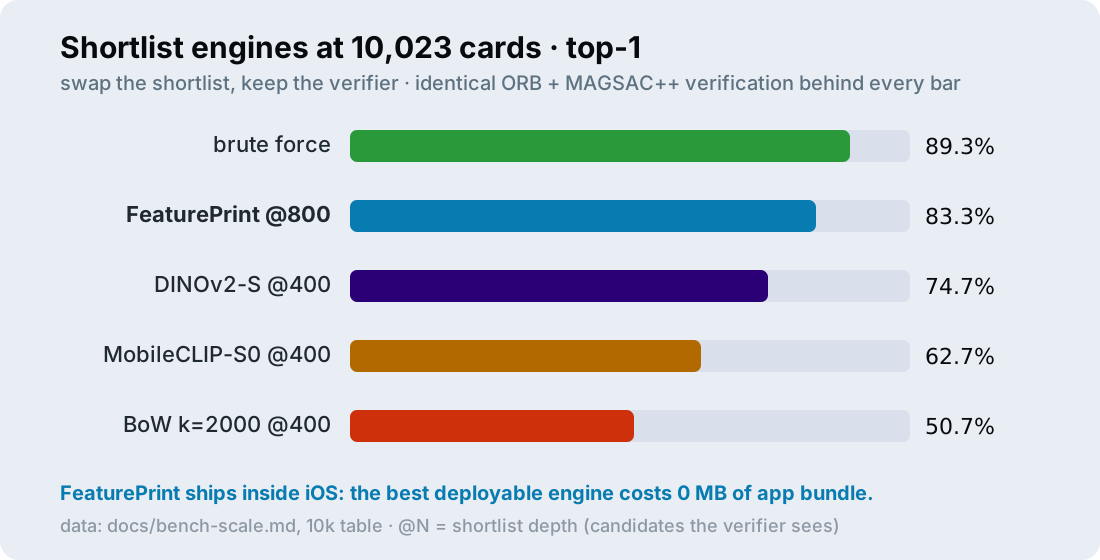
The best shortlist method at 10k was FeaturePrint: 83.3% top-1 with an 800-card shortlist, 331 ms per query, and zero megabytes added to the app, because it ships with the OS. It beats DINOv2 beyond ~2k items: the OS's representation keeps near-identical printings apart, while semantic embeddings were trained to pool them. It's the seventeen-Lightning-Bolts problem all over again.
FeaturePrint TL;DR, the least-known piece here: FeaturePrint is the image-similarity embedding built into iOS's Vision framework (VNGenerateImageFeaturePrintRequest), from the same on-device representation family Apple says powers photo search. Apple's explanation (from WWDC19 session 222): the upper layers of a classification network contain all the salient information about an image, so Vision reuses those layers as a general-purpose descriptor. A compact Apple-trained network runs on-device and turns any image into a float vector (768 elements on the revision I tested), compared by simple distance.
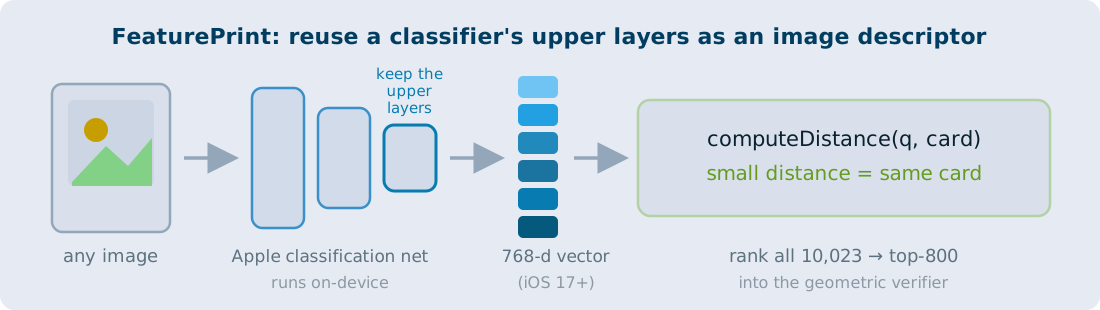
The one catch: FeaturePrint compatibility is tied to the Vision request revision, which can change with an OS update. Rather than ship revision-sensitive vectors, mDex embeds all ten thousand bundled thumbnails on-device, in the background, on first launch, and (conservatively) keys the cache by database + OS version so an update triggers a rebuild.
The entire "model integration" is a few lines of Vision:
// embed one image (query at scan time; all 10k thumbnails on first launch)
let request = VNGenerateImageFeaturePrintRequest()
try VNImageRequestHandler(data: jpeg).perform([request])
let query = request.results!.first as! VNFeaturePrintObservation

// rank the cached card prints, take the top 800 into the verifier
var d: Float = 0
for (i, cardPrint) in prints.enumerated() {
    try query.computeDistance(&d, to: cardPrint)
    scored.append((d, ids[i]))
}
let shortlist = scored.sorted { $0.0 < $1.0 }.prefix(800)
The full 10k leaderboard, for the curious:
| variant | top-1 | shortlist recall | query time | ships how |
|---|---|---|---|---|
| brute force + MAGSAC | 89.3% | 100% | 4.57 s | shim only |
| FeaturePrint @800 + MAGSAC | 83.3% | 90.7% | 0.33 s | built into iOS · 0 MB |
| FeaturePrint @400 | 78.0% | 83.3% | 0.19 s | built into iOS · 0 MB |
| DINOv2-S @400 | 74.7% | 80.0% | 0.18 s | no small Core ML port |
| MobileCLIP-S0 @400 | 62.7% | 67.3% | 0.30 s | Core ML · +50 MB |
| BoW k=2000 @400 | 50.7% | 51.3% | 0.16 s | shim only |
| old shipped config (BoW @50) | 17.3% | 18.0% | 0.08 s | what the bench fixed |
Two free lunches, found only by benchmarking:
- Apple FeaturePrint: the best deployable shortlist I tested, no bundled model.
- MAGSAC++: a drop-in replacement for classic RANSAC in OpenCV. In this benchmark it cut verification from 62 ms to 17 ms, for a one-line change.
Both engines ship in the app: classical BoW covers scans until that first-launch FeaturePrint indexing finishes, then the app switches over automatically. And below ~1k cards, BoW is still the right tool anyway.
Full circle: stress-tested by my own benchmark
FORB's animated_cards category happens to be Pokémon cards: the database is clean official scans, and the queries are real eBay listing photos with verified answers, complete with sleeves, glare, table shots, and weird angles. The harness runs the same 150 queries against databases of 500, 2k, 5k, and 10k cards, so any drop in accuracy comes from scale and nothing else.
The queries are also deliberately harder than real life: they're uncropped, while mDex always hands its matcher a clean crop from the viewfinder guide. So read the absolute numbers as a stress test. What transfers is which configuration beats which.
Top-1 accuracy across the sweep. Watch the classical rows fall off a cliff while verification-first rows barely move:
| top-1 | 500 | 2k | 5k | 10k |
|---|---|---|---|---|
| verify everything + MAGSAC | 90.7% | 90.0% | 89.3% | 89.3% |
| FeaturePrint @800 | 83.3% | |||
| FeaturePrint @400 | 86.7% | 82.7% | 78.0% | |
| DINOv2-S @400 | 86.7% | 78.7% | 74.7% | |
| MobileCLIP-S0 @400 | 82.0% | 70.0% | 62.7% | |
| BoW k=2000 @400 | 90.0% | 76.0% | 60.0% | 50.7% |
| old shipped config (BoW @50) | 59.3% | 40.0% | 24.0% | 17.3% |
And the price you pay per query: the shortlist rows stay flat while brute force grows linearly with the database.
| query ms | 500 | 2k | 5k | 10k |
|---|---|---|---|---|
| verify everything + MAGSAC | 195 | 883 | 2,303 | 4,566 |
| FeaturePrint @800 | 331 | |||
| FeaturePrint @400 | 186 | 188 | 186 | |
| BoW k=2000 @400 | 220 | 186 | 162 | 160 |
The matching engine is only half the product
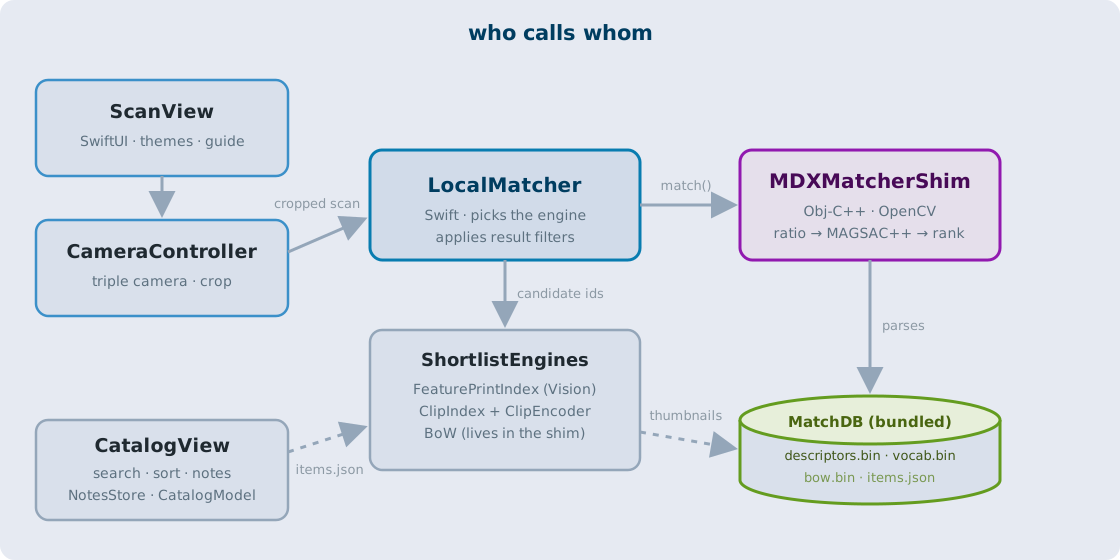
The app is a SwiftUI shell around an Objective-C++ engine. LocalMatcher passes each cropped capture to MDXMatcherShim, a thin wrapper around OpenCV (installed via Swift Package Manager). The shim parses the binary database, runs the full pipeline from earlier (shortlist, then ratio test, then MAGSAC++), and returns ranked card IDs with their details and prices.
The scan screen draws itself as a physical device, LEDs pulsing while the matcher runs. Favorite detail: the Game Boy theme posterizes the freeze-frame to the four DMG greens until the match comes back.
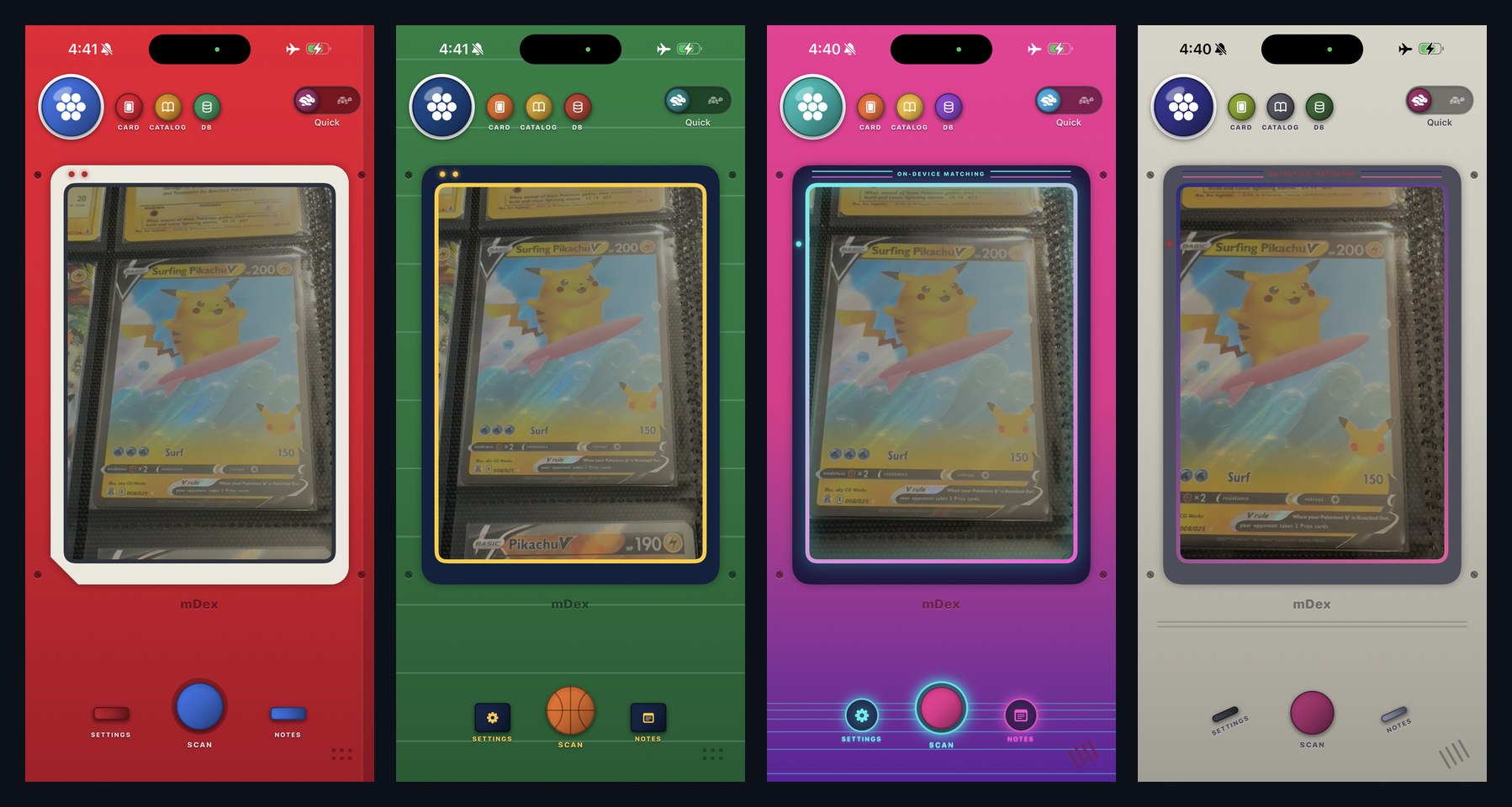
One design trick does a surprising amount of heavy lifting: the viewfinder guide forces the crop. You frame the card inside a card-shaped guide, and the capture is cropped to exactly that box before it ever reaches the matcher. Every query is already a clean, card-shaped image: no table, no sleeve edge, no neighboring cards. Half of "robust matching" is never letting garbage into the matcher, and it's also why the bench numbers (uncropped eBay photos) are a floor rather than an estimate.
One camera gotcha deserves a warning label: on my test phone, the wide camera simply couldn't focus at card-filling distance (about 20 cm), and no amount of software fixed that. The cure is .builtInTripleCamera, a virtual camera that fuses the ultra-wide, wide, and telephoto lenses and hands off to a macro-capable one as the card gets close.
Choose your own rabbit hole
Every technique here runs deeper than a weekend project needed to go. If one caught your eye, here's where to start:
- ORB descriptors: the original ORB paper (ICCV 2011), or the gentler OpenCV ORB tutorial.
- The ratio test: Lowe's SIFT paper (IJCV 2004), section 7.1. Twenty years old and still the first filter everyone reaches for.
- Homography + RANSAC matching: the OpenCV feature matching + homography tutorial is a working version of this post's verifier in ~30 lines.
- MAGSAC++: the paper, plus OpenCV's RANSAC shootout that convinced me to switch.
- Bag of visual words: Video Google (ICCV 2003), the paper that imported tf-idf text search into computer vision.
- FeaturePrint: WWDC19 session 222 and Apple's image-similarity sample.
- Play with matchers in your browser: the Image Matching WebUI Space on Hugging Face runs 30+ matchers, classic SIFT through LoFTR and LightGlue, on any image pair you upload. The fastest way to build intuition for keypoints and inliers.
- Sparse to dense in text search: Dense Passage Retrieval (2020), the swap this post makes for card images, playing out in web search.
- Modern embeddings: DINOv2 and MobileCLIP, the other embedding shortlists FeaturePrint outperformed in this benchmark.
- The benchmark: FORB (NeurIPS 2023), queries and all, if you want to run your own pipeline against it.
Steal these three things
- Use retrieval for speed and geometry for trust. Once the correct card survives the shortlist, geometric verification almost always ranks it first. Spend the improvement budget on shortlist recall.
- Check what your platform already ships. Apple FeaturePrint beat models I'd have had to bundle, for zero megabytes.
- Crawl your own corner of the world. One dataset became my price tracker, my benchmark, and my packing list for the National.
Update — August 6, 2026: the matching engine is now open source. Read the release walkthrough or get the code. Follow along for the next experiment.
Read next
mDex is open source: bring your own catalog
Bring your own catalog to the offline visual matcher, and reproduce the benchmarks behind it.
I put every CSI button in a CLI
Building Overcast: the real algorithms behind the hacker-movie tropes, connected to an agent that remembers.